Server Logging
Want to be fully updated with what is happening in your Discord server? We have you covered with our wide range of logged events.
 Find out More
Invite
to Server
Find out More
Invite
to Server
List of Loggable Events
ModzBott allows you to choose which channel your server logs are sent to and which events are
logged.
More information can be found here.
Edited Messages
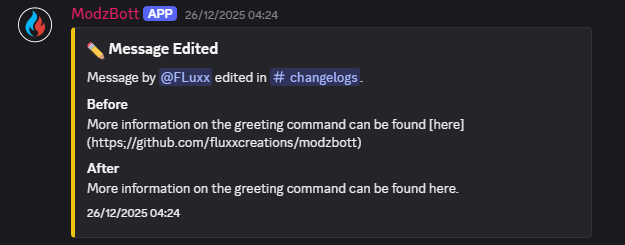
Shows that a message has been edited, who edited the message, which channel the message is in, what the message use to say, what the message says now and provides a timestamp.
Add ModzBott
Kicking Members
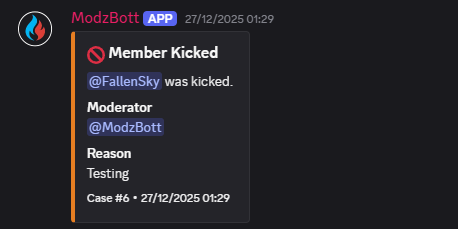
Shows you who has been kicked, who kicked the user, shows a reason (if the moderator gave one). Also provides a case number and timestamp.
Explore cases in the DocsBanned Members
Provides info on who has been banned, who banned them and why (if they gave a reason), alongside a case number and a time frame.
Add to Discord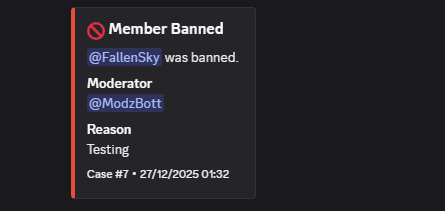
Deleted Messages
Gives information on who deleted the message and where it was deleted from, also provides the message content* with a timestamp.
*Not all message delete logs will contain message content. This is a Discord limitation and may be able to work on a fix for this.
Add to Discord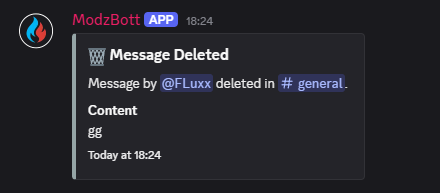
Channel Purges
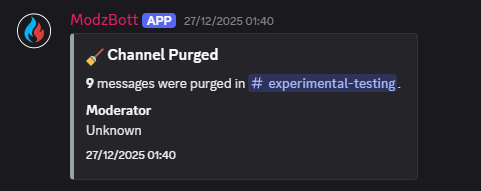
Find out how many messages have been deleted, which channel they were deleted from, who purged the channel and when it happened.
Add to Discord
Assigned / Removed Roles
Find out which role has been removed or given to a member, who gave the role. Also gives a case number and time stamp.
Add to Discord
Edited Username
Find out who changed their name, what it was previously and what they changed it to.
Add to Discord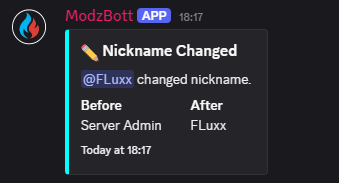
Member Time Outs
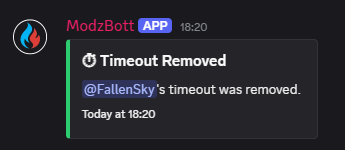
Find out who has been timed out, when their timeout will be removed and when it has been removed.
Add to Discord